
Applications that are built on Firebase or Google Cloud Firestore are commonly seen in web application assessments. The Firestore SDK introduces a real-time data layer that operates differently to GraphQL or a traditional REST API, and it's easy to miss key testing areas if you're not set up to inspect the traffic properly.
This post covers how we approach Firestore during an assessment, what the traffic looks like, and some tooling we've built to make web application pentesting with Firestore easier and more effective.
How Firestore Traffic Works
The Firestore web SDK communicates through two persistent streaming channels to firestore.googleapis.com:
- Listen channel (
/google.firestore.v1.Firestore/Listen/channel) is where the server continuously pushes document changes to the client - Write channel (
/google.firestore.v1.Firestore/Write/channel) is where the client sends document writes to the server
Neither channel uses a conventional REST API and both utilise different protocols that are not human-readable. Write requests are URL-encoded POST requests containing a JSON payload embedded in the form fields, and Listen responses are streaming responses with a custom envelope format that includes byte-length prefixes.
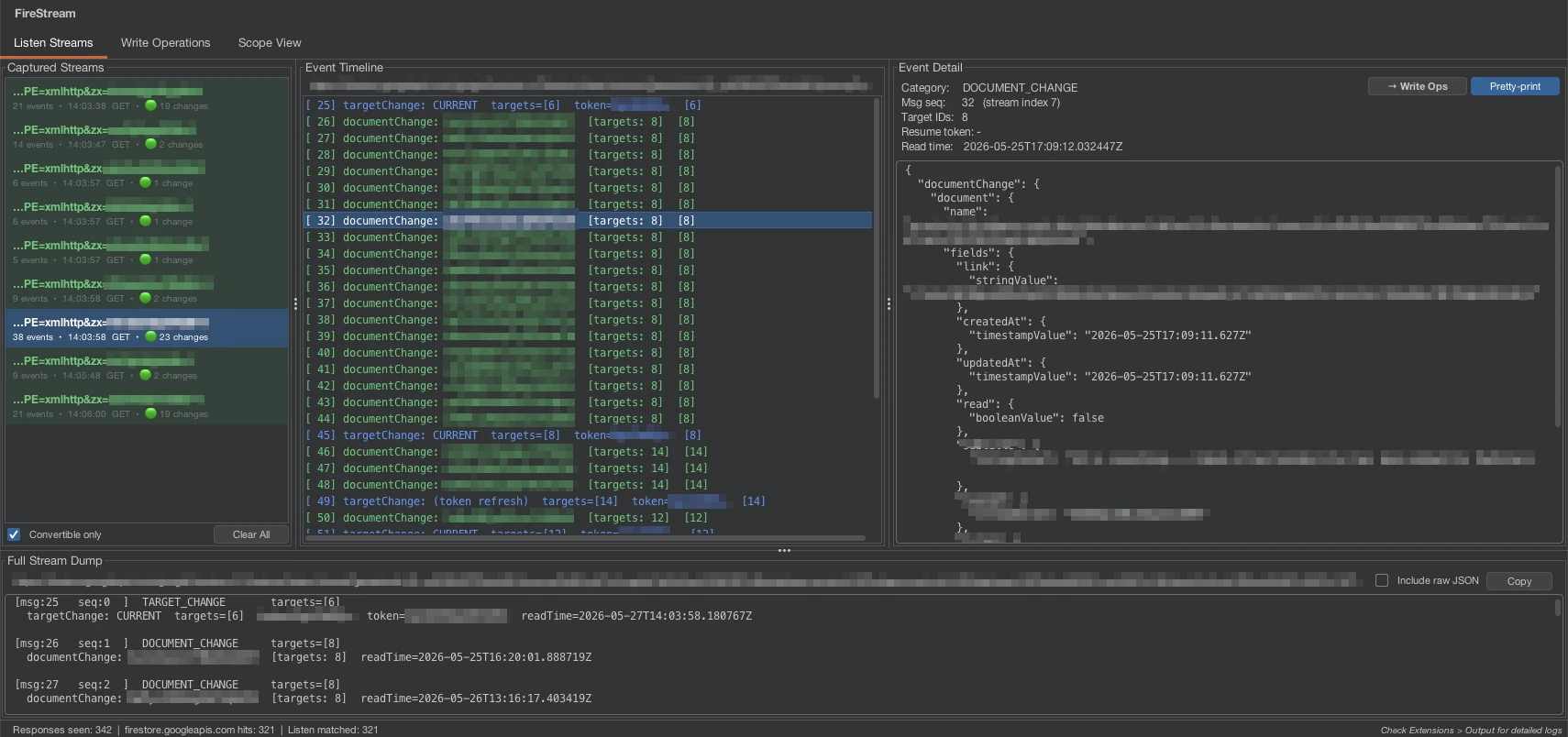
Without decoding, the Listen channel looks like this in a proxy tool:
174
[[1,[{"targetChange":{"targetChangeType":"ADD","targetIds":[2],...
That leading number is the byte length of the payload that follows. The actual Firestore events are nested inside a JSON envelope, and a single response often contains several events batched together.
The Write channel is more straightforward to decode, but the payload is still URL-encoded and contains nested JSON that needs to be parsed to understand the document paths being written to, the fields being modified, and the session parameters that are required for forging writes.
Frustratingly, as we encountered on a recent penetration test, there are additional factors that can make this traffic even more difficult to work with. The ofs session parameter is an offset counter that increments with each write, and the streamToken is a server-issued token that must be included in subsequent writes.
This means that forging writes isn't as simple as capturing one and replaying it, so you need to maintain an active "session" with a valid token and correct offset to successfully forge writes otherwise you'll receive an error response from the server.
What We're Testing For
Security Rules and Access Control
Firestore access control is defined through Firebase Security Rules; a rules language that determines read and write permissions at the collection and document level.
These rules are the primary security boundary for the data layer and are evaluated on every read and write operation. They can be complex and often contain logic that references the authenticated user's UID, document fields, or other contextual information.
When we're testing Firestore security we're looking for gaps in these rules that could allow unauthorised access or modification of data. Some of the key questions we ask ourselves include:
- Can a user read or write documents outside their permitted scope?
- Do the rules correctly differentiate between authenticated and unauthenticated (or anonymous) access?
- Are rules enforced consistently across all write types, or only for standard updates?
- Can a user access another user's or another tenant's data by modifying a document path?
The Listen channel is useful for initial analysis as it shows which document paths the current session is subscribed to, which in turn shows which paths the authenticated user has read access to. Mapping this across multiple accounts gives an idea of what the data layer exposes and where the boundaries are.
Write Channel Manipulation
Write operations are sent as POST .../Write/channel requests with a URL-encoded body containing session parameters (SID, ofs, streamToken) and a writes[] JSON array. Each Write operation includes the document path being written to, the fields being modified, and the type of write (e.g. update, etc.). By manipulating these parameters and the write payload, we can test for various access control weaknesses and logic flaws in the security rules. Some of the specific manipulations we look for include:
Document path substitution. A "write" targets a specific Firestore document path, typically containing the authenticated user's UID somewhere in it. If security rules rely solely on that path matching the session's UID, substituting another user's UID in the path may succeed.
updateMask removal. Firestore supports partial-field updates using an updateMask. Stripping the mask from a captured write turns a partial update into a full document overwrite. Some rules are written to evaluate specific fields being set and behave differently when the entire document is supplied without a mask.
Field transforms. Firestore's fieldTransforms write type (serverTimestamp, increment, arrayUnion, arrayRemove, etc.) is a distinct operation from a regular document update. Rules that validate specific fields being written in an update write may not account for transforms at all, particularly increment on numeric fields or arrayUnion on arrays, which can be used to modify document state without triggering the expected rule logic.
Session parameters. The Write channel is stateful and each POST carries an ofs counter that increments per send, and a streamToken that is issued by the server. An active session with a current token and correct offset is sufficient to forge writes. This is important in cross-account testing scenarios where you're evaluating whether writes from one authenticated session can modify documents owned by another.
What Findings Look Like
The findings depend on the application and how well the security rules are written. Practically, they often look like one or more of the following:
- Missing or over-permissive rules that allow unauthenticated reads or writes
- IDOR (Insecure Direct Object Reference) by writing to or reading from another user's documents by substituting an account identifier in the document path
- Broken access control between user roles or tenant accounts
- Logic gaps in rules that evaluate
updatewrites but nottransformoperations - Excessive read exposure, where clients are subscribed to collections or documents they have no functional need to access
BurpFireStream
To make this testing practical we've built BurpFireStream (aka "FireStream"), which is a Burp Suite extension that decodes both Firestore streaming channels in real time and provides tooling for the manipulation and analysis of the underlying protocol.
On the Listen side, it decodes every captured response into individual Firestore events with a filterable stream list, event timeline, and JSON viewer. A Scope View tab aggregates all observed document paths into a tree, giving a working map of the collections and documents the client has access to across a session.

For Write channel testing, it decodes captured write operations and provides a "forge" panel to modify and resend them. This includes controls for document path substitution, updateMask removal, field transform construction, and replaying writes against a different session.
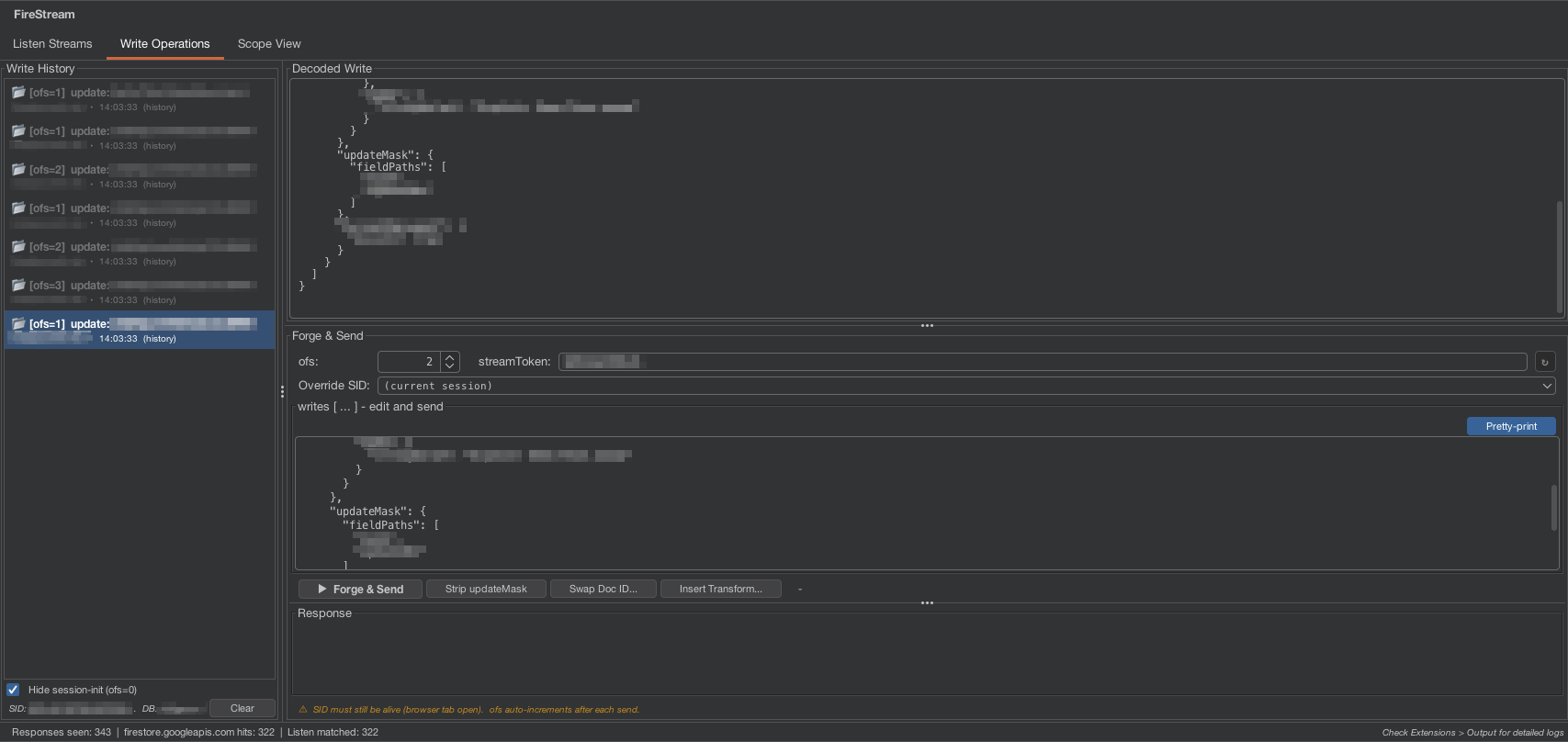
We've used this feature extensively in recent assessments to test for access control weaknesses and logic flaws in security rules, and it's been invaluable for testing the more complex attack scenarios that would be difficult to manage manually (e.g. maintaining session state for forging writes).
FireStream is open source and available on GitHub.
Testing Firestore-Backed Applications
The standard approach of using a proxy tool like Burp Suite can mean that pentesters don't focus on the Firestore interactions, or may struggle with identifying vulnerabilities like document path substitution or insecurely configured rules for updating field values.
As someone procuring a web application pentest, if the application relies on Firestore then that means testing the security of that data layer as well. FireStream is built specifically for this and handles the decoding and manipulation work that should make pentest coverage simpler and easier.
If you'd like to discuss how we approach Firestore testing as part of a web application assessment, get in touch.