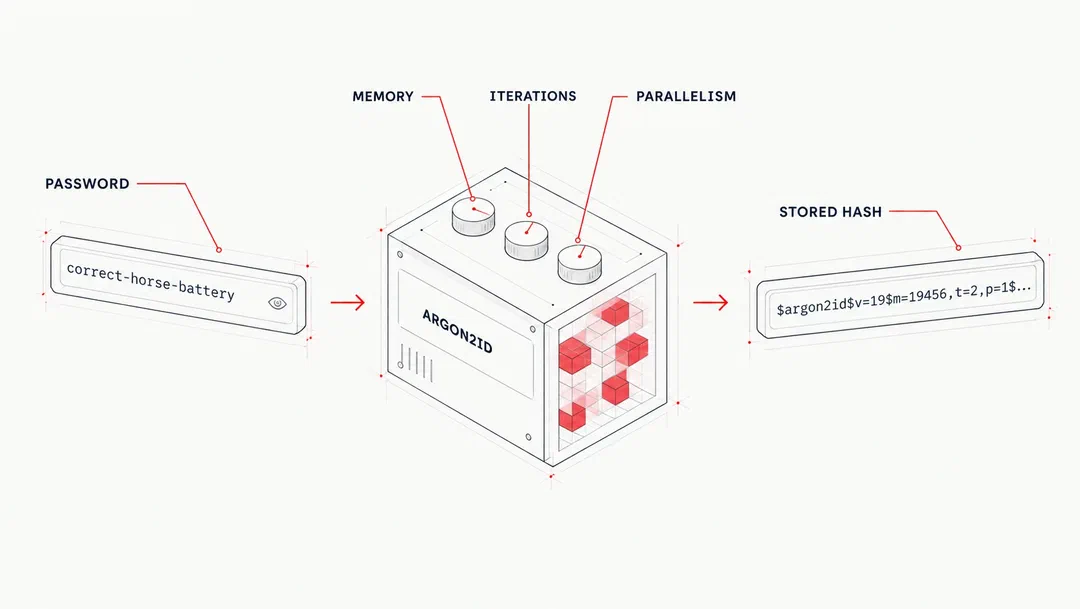

Passwords should be stored using a hashing scheme that's designed to resist offline password cracking, rather than in a reversible format. Building your application's authentication system with an insecure storage mechanism is a sure-fire way to make a data breach even more impactful to your users than it already would be.
This article covers three commonly used options in current OWASP guidance for password storage (Argon2id, scrypt, and bcrypt - or PBKDF2 if FIPS-140 compliance is required), how to choose between them, what parameters to set, and how to migrate an existing user base off a legacy hash without forcing a mass password reset.
Hashing is not encryption
Encrypting a password and storing this in a database is not the correct approach. An encrypted password is reversible in some shape or form, regardless of any controls surrounding the key or other vectors. If an attacker obtains the decryption key or otherwise gains the ability to decrypt the database, the stored passwords can be recovered in plaintext.
The correct approach is to hash passwords with a dedicated password hashing algorithm. Password hashing is meant to make the process of recovering the original plaintext password from the stored hash values computationally infeasible.
There is a method of obtaining the cleartext of a hashed password through password hash cracking attacks. In this case, cracking a hash means guessing candidate passwords, hashing each guess with the same algorithm and parameters, and comparing the result to the stolen hash.
Verification of the password (during user authentication) works by hashing the user provided password and running a comparison against the stored hash, rather than comparing the plaintext values of the password.
The three algorithms described below are deliberately expensive to compute, with tunable costs intended to make offline password guessing significantly more difficult, whilst remaining practical for legitimate authentication implementations.
Why general-purpose hashes shouldn't be used for password storage
MD5 and SHA-1 were built to be fast and efficient because most of their uses (checksums, file integrity, deduplication) benefit from this speed. Modern GPUs can evaluate these hash formats at an extremely high rate, allowing attackers to "crack" large amounts of stolen password hashes in a relatively short amount of time. Weak, common, and even moderately complex passwords are easily obtained through brute force and dictionary/mutation style attacks.
Quite a lot of popular websites used these algorithms for password storage in the past, as discovered through unfortunate data breaches, despite scrypt and bcrypt being available for years before those breaches occurred.
One option that was used to further bolster the effectiveness of these hashes was to use a salt. Salting a fast hash stops precomputed rainbow table attacks, but in a situation where an attacker is able to gain access to an application's hash data, they'll likely be able to obtain the salts too.
Password hashing algorithms like Argon2id, bcrypt, and scrypt were developed to solve this issue by being deliberately slow and resource-intensive to compute. If FIPS-140 compliance is required, OWASP recommends using PBKDF2 with at least 600,000 iterations (with PBKDF2-HMAC-SHA-256).
If an application is still storing passwords with MD5, SHA-1, or SHA-256 (even salted), it is highly recommended to migrate to modern password hashing functions.
Comparing Argon2id, bcrypt, and scrypt
| Property | Argon2id | scrypt | bcrypt |
|---|---|---|---|
| Released | 2015 | 2009 | 1999 |
| Resists GPU cracking | Memory-hard: Yes | Memory-hard: Yes | No; primarily CPU/work-factor based |
| OWASP recommendation | Preferred, first choice for new applications | Second choice, if Argon2id is not available | For legacy systems that cannot support Argon2id or scrypt |
| Considerations | Configuration trades memory against iterations, not a simple "more is better" scale | Large memory footprint (128 MiB at OWASP's minimum setting) can be a problem for some environments | Maximum password length of 72 bytes |
All three appear in current OWASP guidance, and none of them are necessarily wrong for an existing application built on one of them. The main differences between them are based on tuning and resource requirements.
Argon2id
Argon2id is the current recommendation for password storage. It won the Password Hashing Competition in 2015 and was designed specifically to resist both GPU-based cracking and side-channel attacks. The "id" variant combines characteristics of Argon2i and Argon2d and is the recommended option for password hashing.
Memory use is part of the cost of computing the hash, which makes highly parallel password cracking more expensive than it would be with a fast hash or a password hashing scheme that uses very little memory.
Argon2id has three main parameters:
- Memory (m)
- Iterations or time cost (t)
- Parallelism (p)
OWASP's current minimum recommendation is 19 MiB of memory, two iterations, and a parallelism value of 1. It also gives alternative configurations that trade memory against additional iterations. Your actual configuration should be benchmarked on the systems that would be performing the authentication.
Node.js added built-in Argon2 support in v24.7.0. The crypto.argon2() and crypto.argon2Sync() APIs return the raw derived key rather than a single ready-to-store password hash string.
// Node.js Argon2id example (requires Node.js 24.7.0+)
const crypto = require('node:crypto');
const password = 'mysecretpassword';
const salt = crypto.randomBytes(16);
const memory = 19456;  // 19 MiB, in 1 KiB blocks
const passes = 2;      // two iterations
const parallelism = 1; // one degree of parallelism

const derivedKey = crypto.argon2Sync('argon2id', {
  message: password,
  nonce: salt,
  memory,
  passes,
  parallelism,
  tagLength: 32 // 256-bit output
});

/*
crypto.argon2Sync returns only the raw key.
*/
console.log(derivedKey);
For production password storage, consider using a library that produces a standard PHC string unless you have a specific reason to manage the storage of Argon2 parameters and encoding yourself.
Note
crypto.argon2Sync blocks the event loop while it runs, which is fine for a one-off script but not for a server handling concurrent logins. Use the asynchronous crypto.argon2() in production and reserve the sync form for tooling and examples.The argon2 npm package and Python's argon2-cffi both include a verify() function that does this parsing and comparison for you.
For applications on an older Node.js version, the established argon2 npm package gives you a single PHC string to store in your database, which includes the salt and parameters used to generate the hash. The package also provides a verify() function that parses the stored hash and compares it against a candidate password.
// Node.js Argon2id example, using the argon2 npm package
const argon2 = require('argon2');
const password = 'mysecretpassword';

const hash = await argon2.hash(password, {
  type: argon2.argon2id,
  memoryCost: 19456,   // 19 MiB
  timeCost: 2,         // two iterations
  parallelism: 1       // one degree of parallelism
});

console.log(hash);
Or, in Python, using the argon2-cffi package:
# Python Argon2id example
import argon2

password = 'mysecretpassword'
ph = argon2.PasswordHasher(
    time_cost=2,        # two iterations
    memory_cost=19456,  # 19 MiB
    parallelism=1       # one degree of parallelism
)
password_hash = ph.hash(password)
print(password_hash)
Note
OWASP recommends the following additional alternatives for Argon2id:
- m=47104 (46 MiB), t=1, p=1 (Do not use with Argon2i)
- m=19456 (19 MiB), t=2, p=1 (Do not use with Argon2i)
- m=12288 (12 MiB), t=3, p=1
- m=9216 (9 MiB), t=4, p=1
- m=7168 (7 MiB), t=5, p=1
OWASP treats these as providing an equal level of defence, not a lower and higher tier. The choice between them comes down to whether the authentication server has sufficient RAM or CPU headroom.
Argon2id gives you control over the memory and CPU cost, which allows the configuration to be adjusted as the application and any hardware changes.
scrypt
scrypt was designed to make large-scale password cracking more expensive by requiring significant amounts of memory as well as computational work.
Its main parameters are:
- N, which controls the main CPU and memory cost
- r, which controls the block size
- p, which controls parallelism
OWASP currently gives N=2^17 (128 MiB), r=8 and p=1 as a minimum configuration. Its alternative configurations lower N while raising p to compensate, for example N=2^16 with p=2, or N=2^15 with p=3. OWASP presents these as configurations that provide a similar minimal level of defence, trading memory usage against parallelism.
As with Argon2id, these values should be treated as a starting point. The appropriate configuration depends on the hardware available to the application, the number of concurrent password verifications it needs to support, and the security requirements of the system.
In production, store the salt, scrypt parameters, and derived key using your application's established password-hash representation.
// Node.js scrypt example
const crypto = require('node:crypto');
const password = 'mysecretpassword';
const salt = crypto.randomBytes(16);
const N = 2 ** 17; // CPU/memory cost
const r = 8;       // block size
const p = 1;       // parallelism

const passwordHash = crypto.scryptSync(password, salt, 64, {
  N, // 'cost' alias (default 16384)
  r, // 'blockSize' alias (default 8)
  p, // 'parallelization' alias (default 1)
  maxmem: 256 * 1024 * 1024 // Node's default ~32 MiB ceiling is too low for N=2^17 (needs ~128 MiB)
});
# Python scrypt example
import hashlib
import os

password = b'mysecretpassword'
salt = os.urandom(16)
n = 2 ** 17  # CPU/memory cost
r = 8        # block size
p = 1        # parallelism

password_hash = hashlib.scrypt(
    password,
    salt=salt,
    n=n,
    r=r,
    p=p,
    maxmem=256 * 1024 * 1024,  # OpenSSL's ~32 MiB default is too low for n=2**17 (needs ~128 MiB)
    dklen=64,
)
In these implementations, the default scrypt memory limit is roughly 32 MiB. Raise maxmem explicitly when necessary.
Note
OWASP recommends the following additional alternatives for scrypt:
- N=2^17 (128 MiB), r=8 (1024 bytes), p=1
- N=2^16 (64 MiB), r=8 (1024 bytes), p=2
- N=2^15 (32 MiB), r=8 (1024 bytes), p=3
- N=2^14 (16 MiB), r=8 (1024 bytes), p=5
- N=2^13 (8 MiB), r=8 (1024 bytes), p=10
For a server handling concurrent requests, prefer the asynchronous crypto.scrypt() API rather than scryptSync() as the synchronous form blocks Node.js's event loop while the method runs.
An existing application using scrypt correctly does not gain much by changing algorithms simply for the sake of changing them.
bcrypt
bcrypt has been in production use since 1999. OWASP now positions it as an option for legacy systems that cannot support Argon2id or scrypt, rather than a first implementation choice. It remains an appropriate option where a language or framework doesn't yet support the alternatives.
Its main limitation, compared with Argon2id and scrypt, is its fixed memory requirement. The primary configuration parameter is the work factor, which controls the amount of computation required during hashing.
OWASP recommends a work factor of at least 10 and the guidance advises selecting the highest practical value for the system. Each increase of one doubles the computational cost, so increasing the work factor from 10 to 12 makes the calculation roughly four times more expensive. Check that the work factor has actually been configured, and hasn't just been left at the library's default value.
With Node.js or Python, an example of usage looks like:
// Node.js bcrypt example
const bcrypt = require('bcrypt');
const password = 'mysecretpassword';
const saltRounds = 12; // work factor
const hash = await bcrypt.hash(password, saltRounds);
console.log(hash);
# Python bcrypt example
import bcrypt
password = b'mysecretpassword'
salt = bcrypt.gensalt(rounds=12)  # work factor
password_hash = bcrypt.hashpw(password, salt)
One consideration with bcrypt is that the algorithm only uses the first 72 bytes (not characters) of its input with most implementations. Applications using bcrypt should enforce a maximum length supported by their specific implementation, commonly 72 bytes. Pre-hashing the password with a fast hash can be used to work around this, but can also introduce a password-shucking weakness if the inner hash is known or can be obtained elsewhere.
Password handling should also be consistent for Unicode input. In particular, byte-based limits such as bcrypt's 72-byte limit are different from character limits because UTF-8 characters can occupy multiple bytes.
Note
bcrypt(base64(hmac-sha384(data:$password, key:$pepper)), $salt, $cost), rather than inventing your own.bcrypt is still a reasonable option for an existing application built on it, especially where the change of algorithm would introduce unnecessary complexity. For a new system, Argon2id or scrypt is the better starting point.
How to choose the parameters
There is no single parameter value that will be correct indefinitely. Password verification consumes resources on the application server, so increasing the cost is not free.
The best way to choose the parameters is to benchmark password verification on production-class hardware and test with the expected level of concurrent authentication. A reasonable configuration needs to make offline cracking attacks expensive enough, while keeping normal authentication within an acceptable resource and latency budget.
The Argon2id, scrypt, and bcrypt sections above give OWASP's current baseline and alternative configurations for each algorithm; use those as your starting point for benchmarking the parameters that work best for your infrastructure rather than fixed values.
Note
Whichever algorithm you use, the correct move on a routine basis is not to pick a number once and leave it. Hardware gets faster. A parameter set that resisted cracking in 2014 may not resist it in 2027, and revisiting these values periodically should sit alongside other recurring security maintenance, not be a one-off decision made at initial build time.
Migrating off a legacy hash without forcing a reset
Moving away from a legacy password hash does not necessarily require an immediate reset for every account. The usual approach is to upgrade the password hash the next time the user successfully logs in or changes their password. This is often called a "rehash-on-login" or "silent rehashing" migration.
One example is where an application currently stores the passwords as SHA-256 hashes and is moving to Argon2id. During login, the application can:
- Identify that the account is still using the legacy SHA-256 hash.
- Verify the provided password against the SHA-256 hash.
- If authentication is successful, the application hashes the password with Argon2id and the correct parameters.
- The application then updates the stored hash to the new Argon2id hash.
The plaintext password is already available during that authentication request, so there is no need to recover the existing password. New accounts and password changes should use the new scheme immediately. Existing, active users are migrated when they next authenticate.
The remaining issue is how to handle inactive user accounts. A user who does not log in will not trigger a rehash, so the application may need a separate policy for old accounts, such as requiring a password reset when they next authenticate.
A similar mechanism would work when changing parameters rather than the algorithms themselves. For example, an application can keep using bcrypt while gradually increasing its work factor, or migrate from bcrypt to Argon2id if/when there is a reason to do so.
Note
Other considerations for password storage and authentication
Do not rely on client-side hashing
If the server accepts the client-derived value as the credential, then this value essentially becomes the password. Client-side hashing does not replace server-side password hashing. When a client-derived value is accepted directly as the credential, an attacker who obtains that value can replay it.
Note
Check passwords against known breaches
Strong password storage does not prevent users from choosing passwords that are already known to attackers. Credential stuffing attacks use previously obtained user credentials, which often come from username/password combinations that have been exposed in public data breaches, phishing, malware or other credential theft.
At account creation and password change, reject passwords that appear in a blocklist of commonly used or known compromised credentials. This is a separate control from password hashing, but it addresses an important part of the authentication process.
Note
Implement multifactor authentication (MFA)
Multifactor authentication (MFA) adds another layer of security to the authentication process. Even if a password is compromised, MFA can aid in the prevention of unauthorised access by requiring a second authentication factor.
One-time codes generated by an authenticator app, hardware OTP tokens, or SMS-based codes are common methods of MFA. SMS-based OTP is weaker than phishing-resistant factors and should generally not be the preferred option when stronger factors are available.
The use of MFA is strongly recommended, especially for accounts with access to sensitive data or administrative privileges. See our guide to authentication security for SaaS applications for a closer look at MFA, session management, and the rest of the authentication picture beyond password storage.
Consider a pepper separately
A pepper is a secret application-layer value that is incorporated into the password before hashing. Unlike a salt, it is not stored in the database.
Implementing a pepper can provide additional protection if the database itself is compromised, but it introduces another secret that has to be protected and managed correctly. Peppering is an additional control, not a substitute for a suitable password hashing algorithm, appropriate parameters and unique salts.
Password storage checklist
- Passwords stored using a dedicated password hashing function such as Argon2id, scrypt, bcrypt or PBKDF2 where FIPS-140 compliance requires it
- Algorithm parameters chosen based on benchmarking against production-class hardware and expected concurrent authentication load
- A unique, randomly generated salt for every password hash, or the password hashing library's built-in equivalent
- Parameters reviewed periodically against current hardware, not set once at launch and left
- A rehash-on-login migration path in place for any account still on a legacy hash or under-configured parameter set
- New passwords checked against known breached credential lists at creation or change
Password storage is one aspect of a secure authentication design. MFA, session handling security, account recovery, rate limiting, and protection against credential stuffing all need to be considered alongside it.
If you want independent assurance of how your application handles authentication security, scope a web application penetration test with us to discuss what that looks like for your application.