Follow your penetration test from day one
Accreditations and memberships



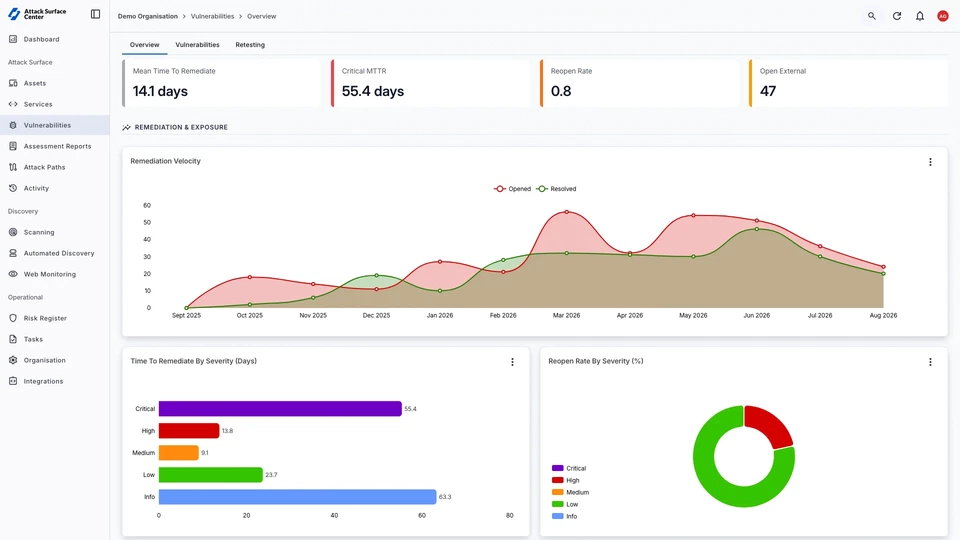
Working alongside your team
Every engagement is delivered by an experienced consultant working in the platform alongside your team. You can see what we've found as we go, with the evidence, the steps to confirm and reproduce the issue, and the remediation guidance for each finding.
Your developers can start fixing while we're still testing, we can verify those fixes before we've finished, and your security team always knows the current status without waiting for an email. By the time the written report is delivered, it confirms what you already knew.
How our engagements run
- Scope, authorisation, and contracts agreed
- Your consultant carries out the testing
- Reports are created and populated alongside testing
- Daily check-ins offered as standard, with critical findings raised the same day
- We debrief the engagement with you and your team
Before testing
Scoping is a conversation
We don't ask you to set up an engagement in the platform. Scoping starts with a short questionnaire or a call with the consultant who will deliver the testing.
Once the scope and authorisation are in place, we'll prepare your access so it's ready before testing starts. There's nothing for your team to configure, no additional fees, and no onboarding project.
You'll speak to the consultant, not a salesperson
The person scoping your engagement is the one who'll be delivering it.A fixed, written quote
The scope is stated clearly, with a fixed price.We'll say if you don't need it
If a narrower testing scope would suit your requirement, that's what we'll recommend.No setup required
Once the scope is signed off, we record it in the platform and set up your reports ahead of the testing window. You just invite your team to review the findings.
Your report, written as we test
- Every issue is validated by hand: The consultant confirms each issue before it appears in the report. Nothing is auto-populated from a scanner.
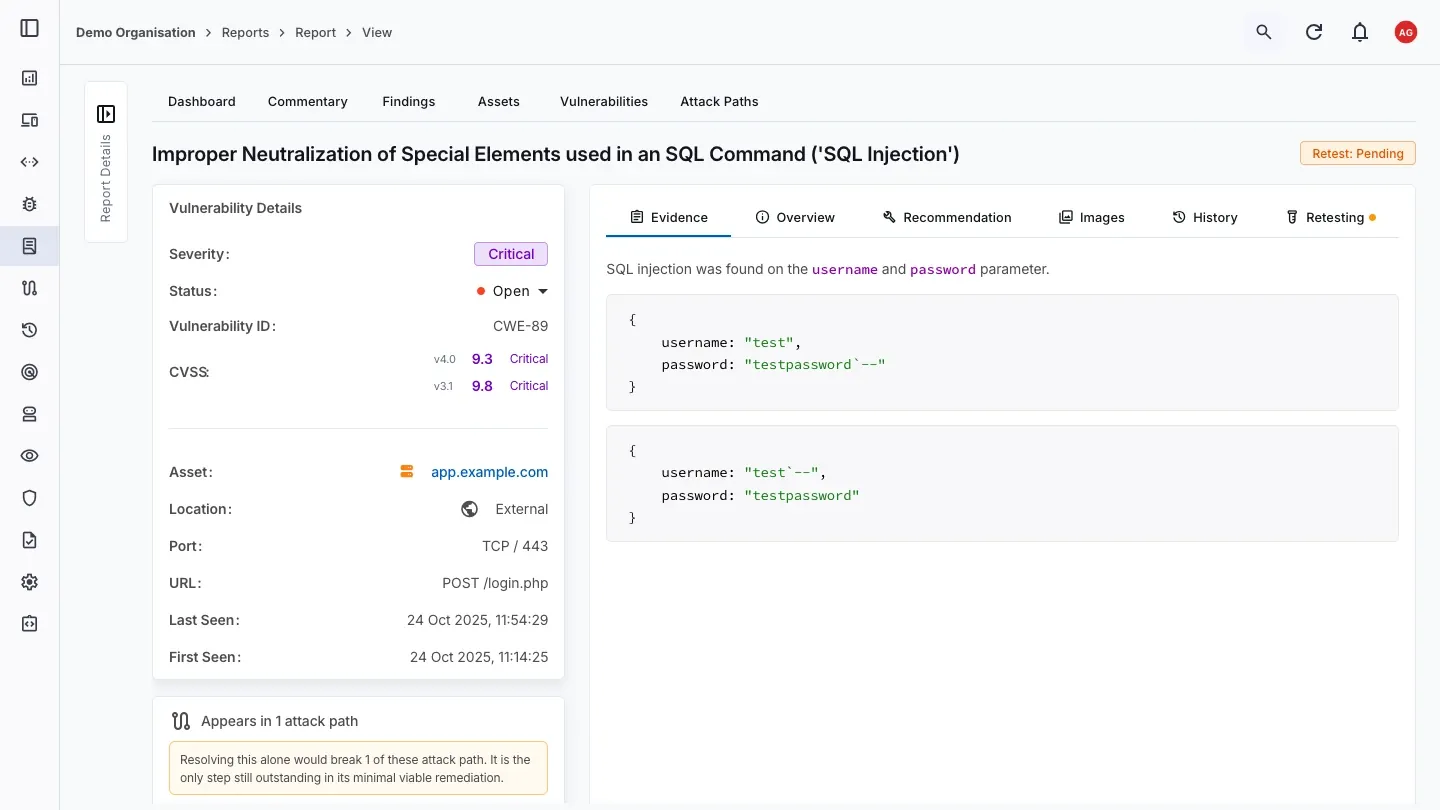
- Full technical detail: Severity, CVSS v4.0 and v3.1 scores, and the affected asset, port and URL.
- Evidence attached to every issue: Requests, responses, and screenshots sit alongside the finding, so your developers can reproduce it without needing to request more information.
- Retest status from the outset: Each vulnerability carries its own status, so you can see what's open, what's been fixed, and what's waiting on a retest.
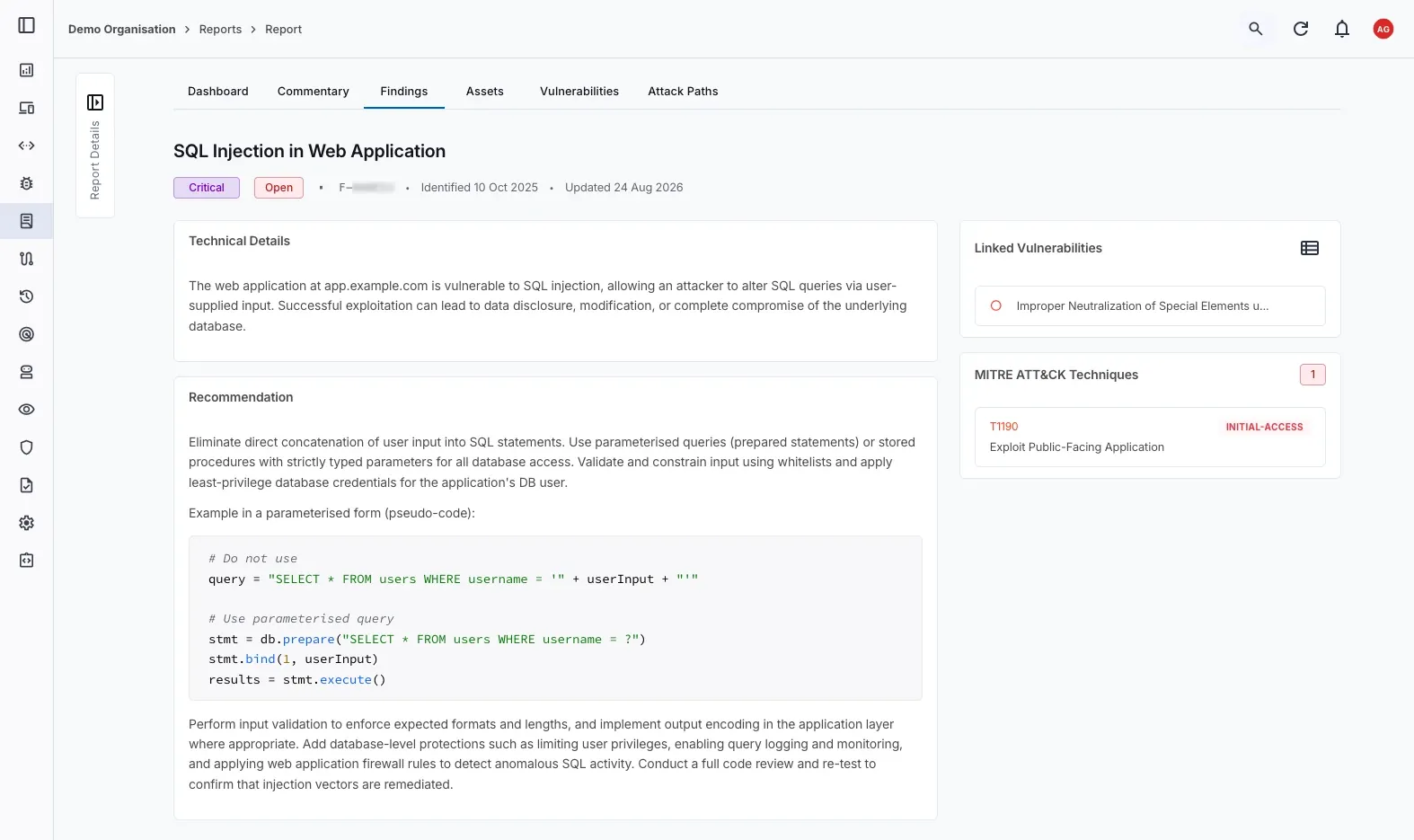
- Written remediation guidance: Each finding provides a recommendation written by the consultant for your environment, rather than pasted from a template.
- Mapped to MITRE ATT&CK: Where applicable, findings are linked to the relevant MITRE ATT&CK technique, so your security team can line the results up against their existing detection coverage.
- Read it in the platform, or export it: Work through the report in the browser, or download the PDF for offline review.
- Collaborative vulnerability management: No forwarding PDFs, CSVs, or spreadsheets. Your whole team works in one place to prioritise and track remediation.
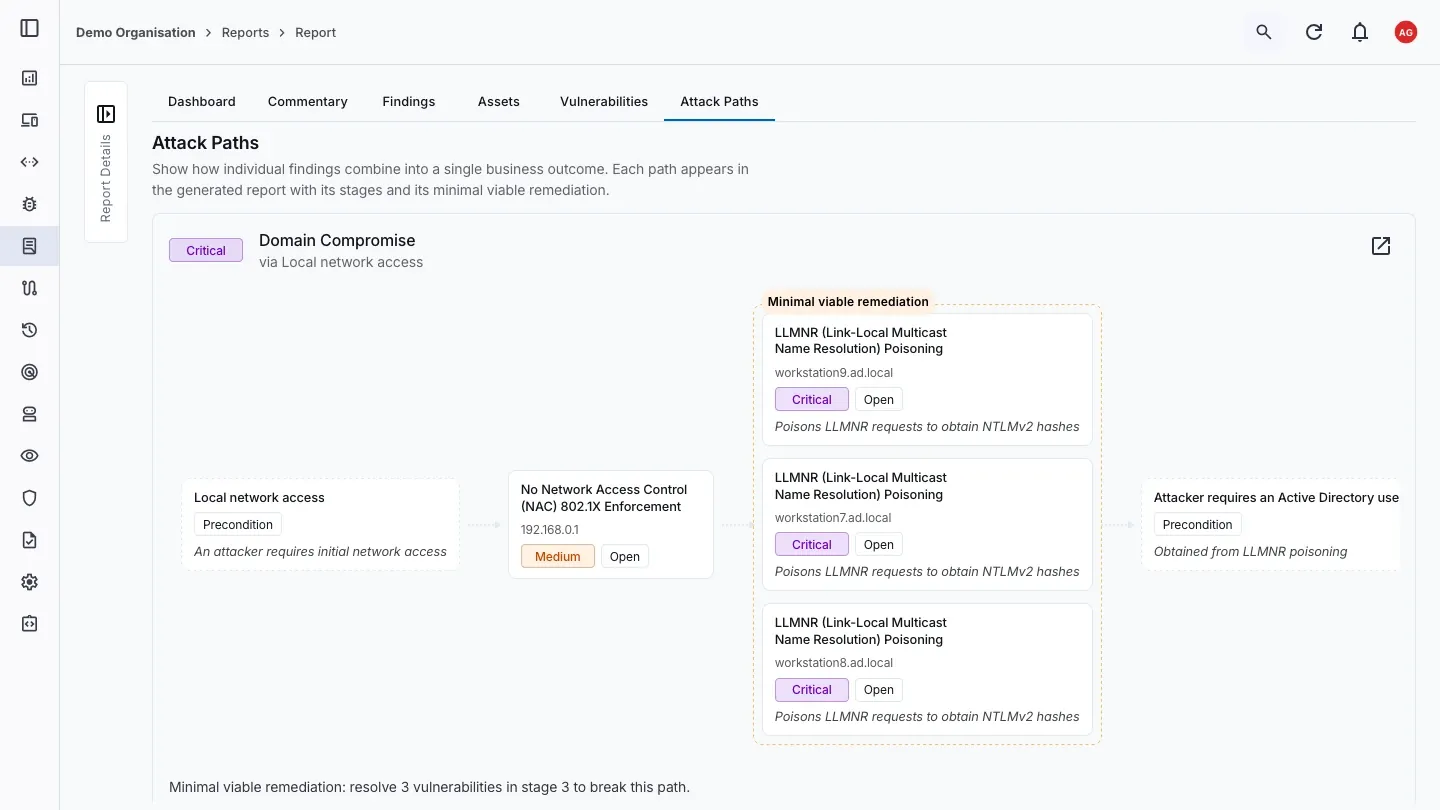
How separate issues combine
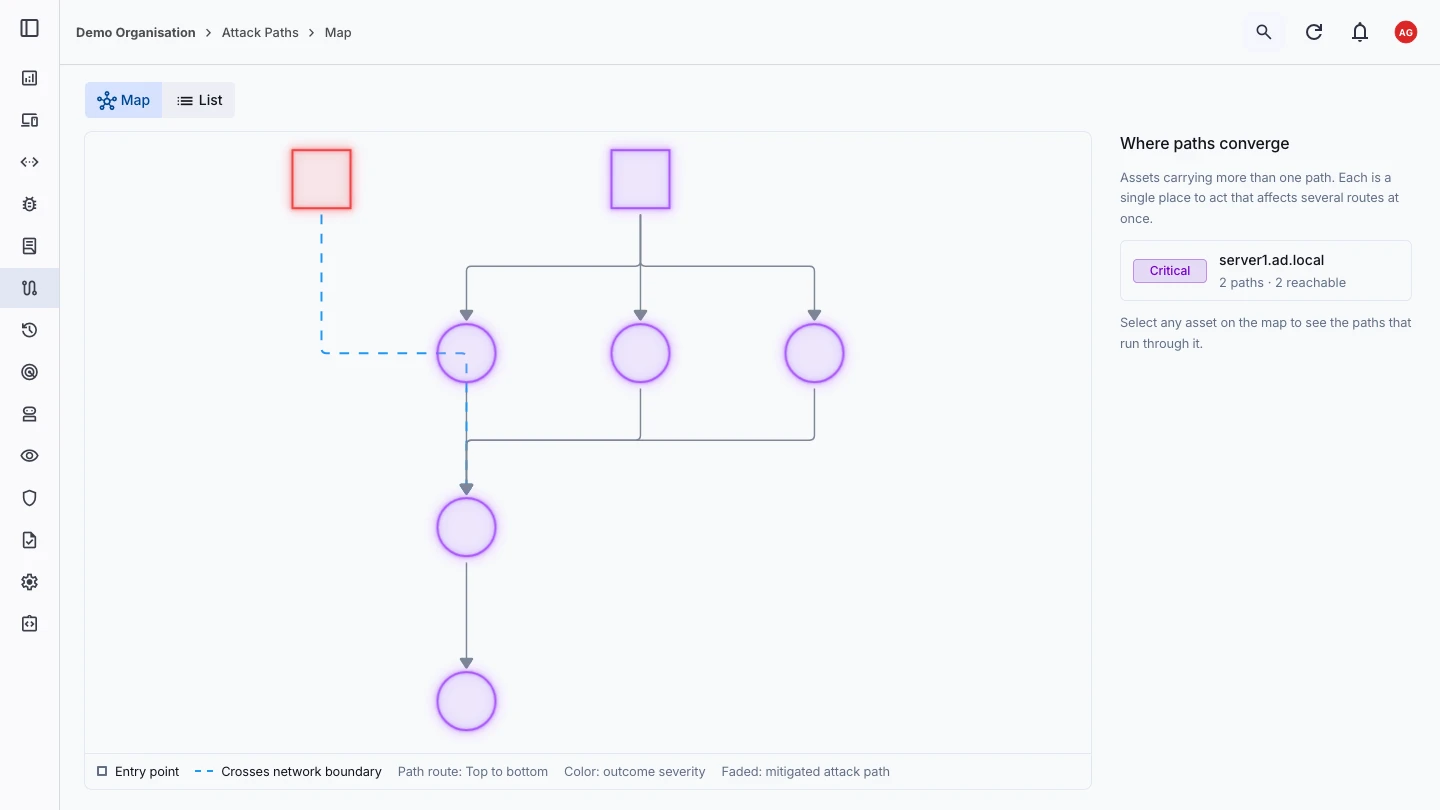
- See the route as well as the list: Each path is drawn from its entry point through to its outcome, showing where it crosses a network boundary.
- Find where paths converge: Assets carrying more than one attack path are highlighted, so you can see where a single fix can affect several routes at once.
- Every stage is evidenced: Each step in the path links back to the finding and the asset it relates to, along with the preconditions an attacker would need to reach it.
- Minimal viable remediation: We identify the smallest set of fixes that could mitigate the attack path, so you can see the quickest route to reducing the risk.
After testing
The engagement doesn't end when the report is delivered
Report within 2 business days
Executive summary and full technical findings, exportable whenever you need it for a customer, board, or auditor review.Attestation of testing
Included as standard on every engagement. Download it as a PDF once the assessment is completed.Remediation tracking
Assign tasks, update vulnerability statuses, and keep a record of who fixed what and when.Kept for as long as you agree
The report, findings, attack paths and remediation history stay available to your team for the retention period set in your engagement terms. You can export the report at any time, or delete data yourself through the platform.Request a retest from the finding
Fix an issue, request the retest from the finding, and add any context for the tester. Included on remotely delivered web application, API, website, and external network engagements.
Monitoring your attack surface between tests
- Automatic asset discovery: Your exposed assets are mapped automatically, rather than relying on a list maintained by hand.
- Visibility between engagements: See what's exposed now, without waiting for the next scheduled test.
- Alongside your findings history: Discovered assets sit in the same account as your test findings and remediation history, so you can see where new exposure meets known issues.
Who gets access
Built for everyone who needs the results
Engineering and development
Security and compliance
Executive and board stakeholders
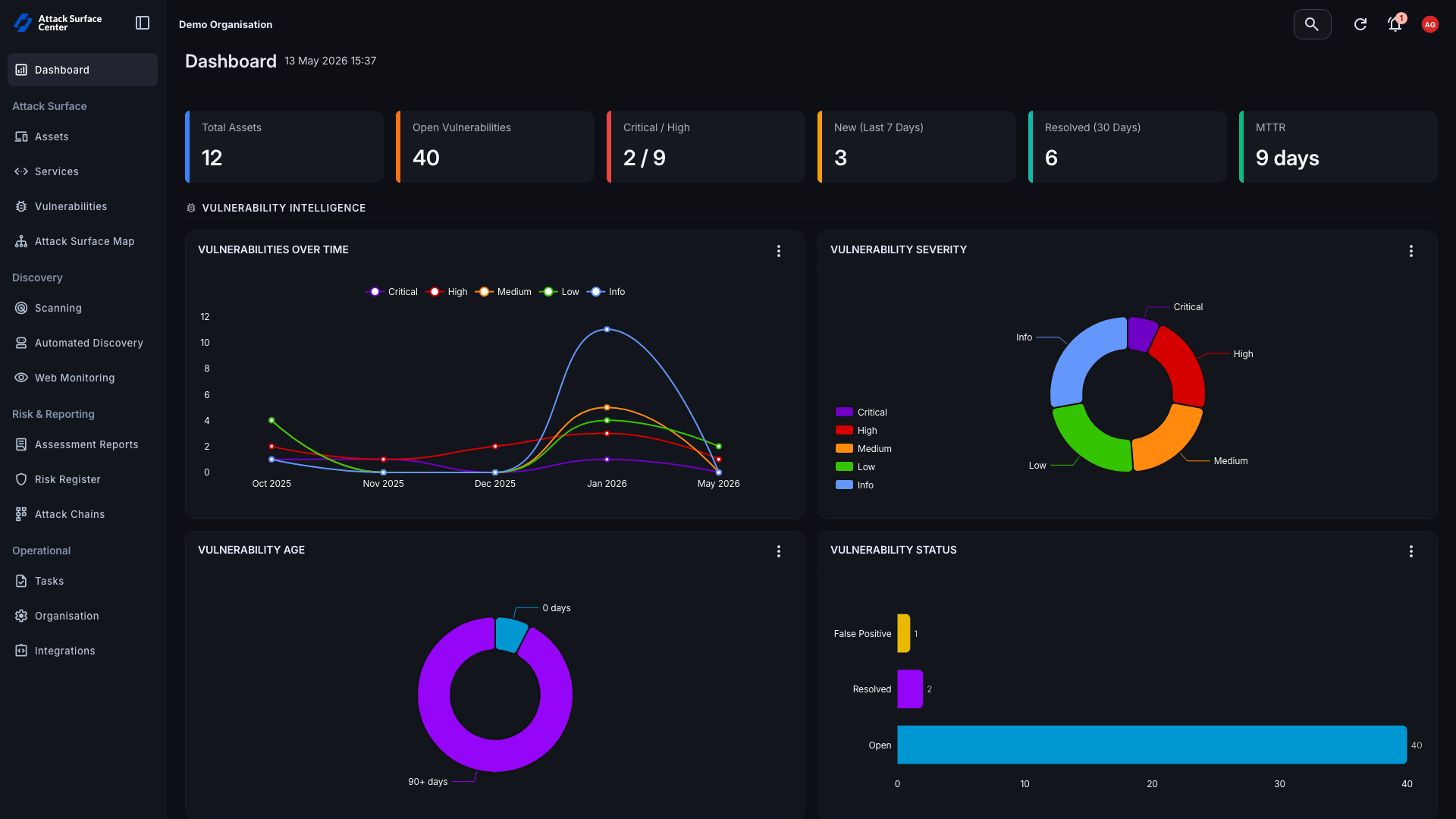
Mean time to remediate, how quickly critical vulnerabilities are closed, and how often issues re-open, in a view they can read without working through the technical report.
This trend builds with every engagement you run with us.
Common questions
Questions about the platform
No. Access to view your reports, manage your vulnerabilities and assets is included with every Exploitr engagement at no extra cost, and it isn't priced separately in your pentest quote.
No. The written report is the main deliverable. If your team already works somewhere else and the platform would only add a step, you can simply download the report and ignore the rest.
No. Add as many people from your team as the results are relevant to, whether that's two developers or your whole engineering, security, and leadership group.
The findings will show in the same organisation account. Your history builds across engagements rather than starting from an empty dashboard each time, so you can see how your remediation efforts are trending between tests.
This applies across every service we offer, so a web application test and an internal network test sit alongside each other.